Kling AI Avatar 2.0 Video Generator

Describe a scene with text or upload an image as the visual starting point. Guide the subject, action, camera movement, lighting, and mood to generate a coherent cinematic video with smooth motion and audio.

Kling AI Avatar 2.0 is not exposed by Kie. This page uses Kling Avatar Pro.

Required inputs: 1 reference image + audio.

0/5000
450Generate

Kling AI Avatar 2.0 Video Generator

Describe a scene with text or upload an image as the visual starting point. Guide the subject, action, camera movement, lighting, and mood to generate a coherent cinematic video with smooth motion and audio.

About

Create Talking Avatar Videos with Kling AI Avatar 2.0

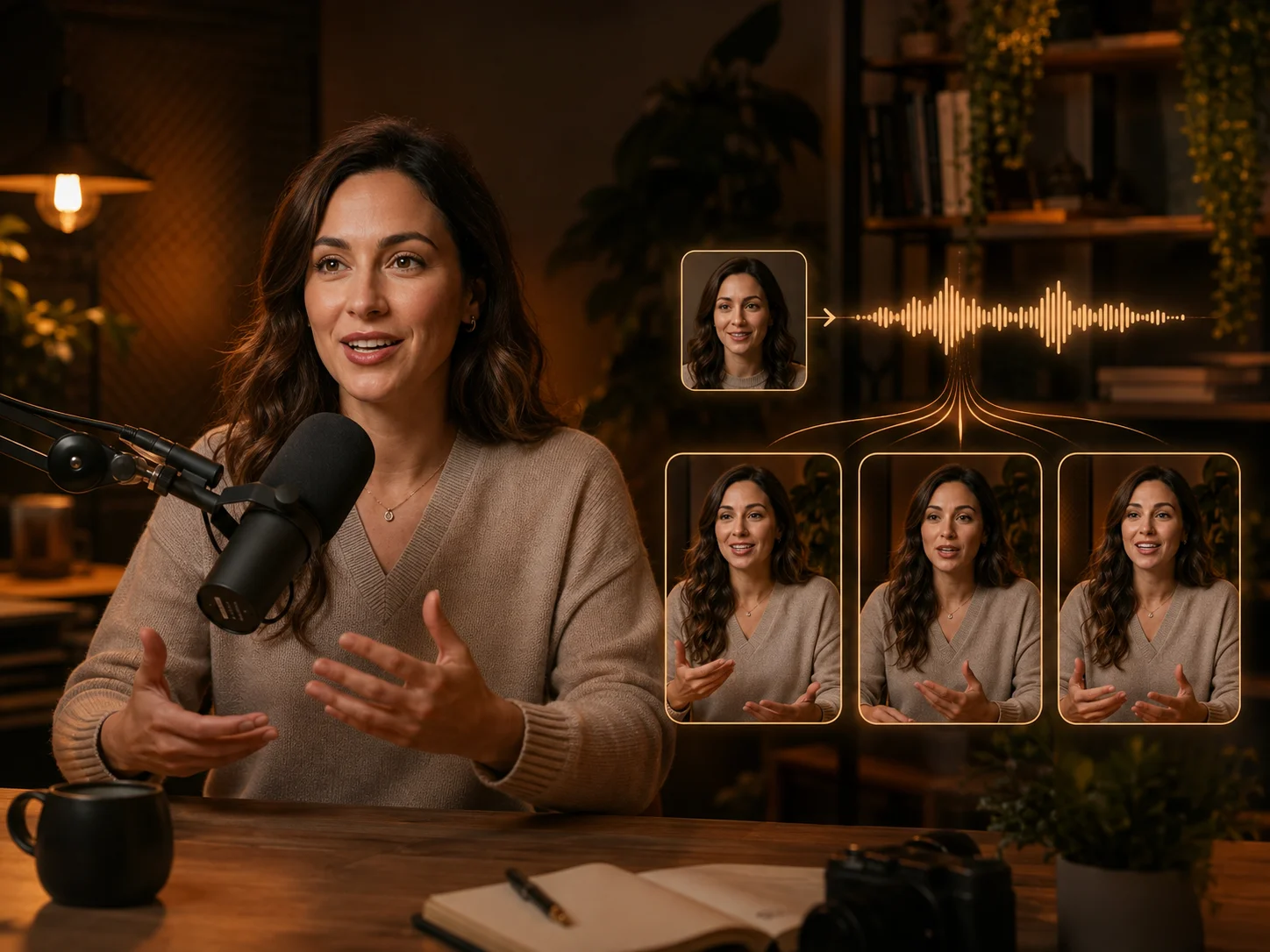
The avatar workflow combines a single visual identity with an audio track, then animates the face, mouth, head, hands, and body around the rhythm of the voice. It supports realistic portraits, illustrated characters, and other stylized subjects when the face and body are clearly presented.

With AI Photo Editor, Kling AI Avatar can help creators produce presenters, lessons, product demonstrations, multilingual narration, storytelling, and singing performances without recording every scene on camera. Optional performance guidance gives additional control over expression, emotion, and movement style.

Create talking avatar videos with Kling AI Avatar 2.0

How to Use Kling AI Avatar 2.0

01

Add a Character Image and Audio

Upload one clear portrait or stylized character image, then provide a finished speech, narration, dialogue, or singing track. Front-facing images with visible facial details and clean audio provide a stronger starting point.

02

Guide the Performance and Generate

Optionally describe the intended emotion, facial expression, gesture, or motion style. Review the selected image and audio, then start generation so the avatar can coordinate its delivery with the track.

03

Preview and Download

Review lip timing, identity consistency, facial expression, hand stability, and the flow of longer passages. Refine the source image, audio, or guidance if needed, then download the preferred result.

Why Use Kling AI Avatar 2.0

Expressive Speech and Singing

Coordinate mouth movement, facial expression, head motion, and body language with spoken or sung audio. The result feels like a complete performance instead of a static portrait with sound placed over it.

Long-Form Avatar Generation

Build continuous avatar videos for lessons, presentations, product demonstrations, interviews, narration, and stories. Longer output helps retain one visual identity across a complete piece of content.

More Stable Gestures and Identity

Preserve recognizable character details while improving facial motion, hand gestures, and overall body-language stability. This gives professional content a more coherent on-screen presenter.

Multilingual Production from One Image

Pair the same character with different supported-language audio tracks to produce localized lessons, campaigns, explainers, and social content without rebuilding or reshooting the presenter.

AI Video Generator Tutorials & Reviews

AI Video Generator Tutorial 1AI Video Generator Tutorial 2AI Video Generator Tutorial 3

Who Use AI Photo Editor

Creators

Create visuals faster without design skills. Turn ideas into images, thumbnails, social posts, and creative assets in seconds.

Designers

Accelerate your creative workflow. Use AI Photo Editor to generate concepts, references, and visual directions, then refine them into production-ready designs.

Marketers

Produce high-converting visuals on demand. Create ads, campaign visuals, and branded images quickly.

QUESTIONS & ANSWERS

FAQs About Kling AI Avatar 2.0

What Can Kling AI Avatar 2.0 Create?+

Kling AI Avatar 2.0 animates one portrait or stylized character image with a supplied audio track, creating a talking or singing avatar video with synchronized mouth movement, expression, and gestures.

What Inputs Does Kling AI Avatar 2.0 Require?+

A character image and an audio file are required. A concise performance prompt is optional and can guide emotion, facial expression, gestures, and motion style.

What Image Works Best for Kling AI Avatar 2.0?+

Use a high-quality image with a clearly visible face and recognizable character details. A clean portrait, balanced framing, and limited obstruction around the face and hands help the model maintain identity and motion quality.

Can Kling AI Avatar 2.0 Use My Own Voice or Singing?+

Yes. You can provide a recorded voiceover, narration, dialogue, or singing track. Cleaner audio and natural pacing generally make it easier to produce stable synchronization and expressive delivery.

How Do I Guide Expressions in Kling AI Avatar 2.0?+

Describe the emotion, action, interaction, and camera behavior in a connected sequence. Keep directions focused and avoid asking for many unrelated movements at the same moment.

Discover More on AI Photo Editor's Models

Create stunning AI videos from text or images with multiple models.

Kling

Kling

Kuaishou video generation

AI Video Tools You May Like

AI Photo Editor is your go-to AI video toolkit for generating, editing, and enhancing videos.

Kling 3.0

Create cinematic multi-shot videos from text or images with consistent subjects and synchronized audio.

Kling 3.0 Omni

Combine text, images, video, and audio references for unified multimodal video generation.

Voice to Video

Combine recorded speech with a visual source to create expressive presenter and character videos.

Wan Animate 2

Transfer character identity and performance with reference-driven animation controls.

Kling AI Lip Sync

Match character mouth movement and facial timing to speech, dubbing, or singing audio.

Create with Kling AI Avatar 2.0

Combine one character image with your audio and optional performance guidance to create a consistent, expressive talking-avatar video in AI Photo Editor.








