Add Your Text or Portrait
Write a scene prompt or upload a clear, well-lit portrait with the face fully visible. A front-facing image gives the generator a stronger reference for the transformation.
 AI Photo Editor
Describe a Mona Lisa-inspired scene or upload a clear portrait, choose your video settings, and generate a Renaissance-style clip with subtle facial expression and natural movement.
Describe a Mona Lisa-inspired scene or upload a clear portrait, choose your video settings, and generate a Renaissance-style clip with subtle facial expression and natural movement.
An AI Mona Lisa video generator turns a written idea or portrait into an animated scene inspired by Leonardo da Vinci's famous painting. It combines Renaissance composition, painterly color, and restrained movement to create a recognizable classical-art effect.
With text input, you can describe the subject, setting, and mood you want. With image input, the generator uses the uploaded portrait as a visual reference and animates it while aiming to retain the person's recognizable facial features.
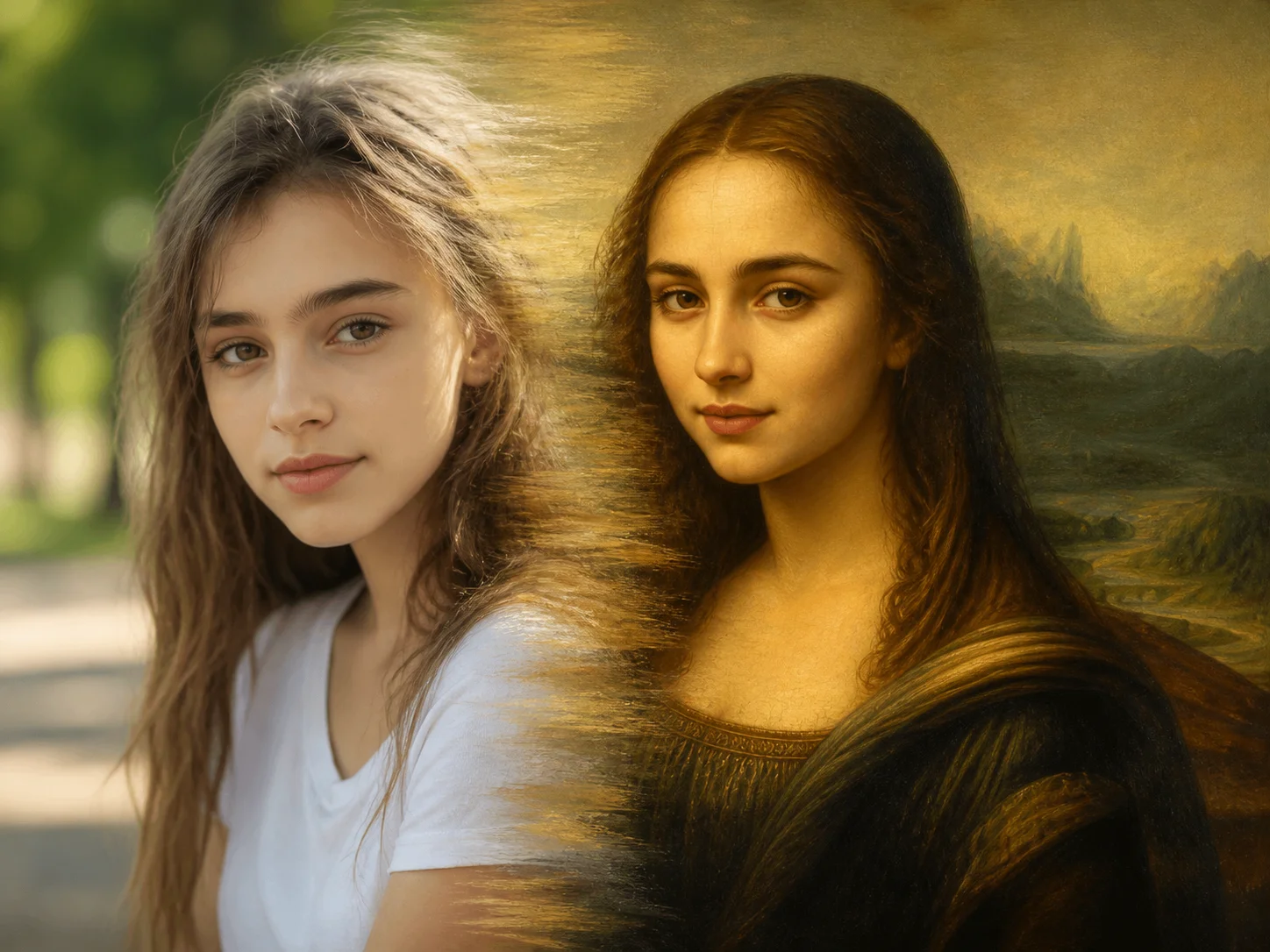
Write a scene prompt or upload a clear, well-lit portrait with the face fully visible. A front-facing image gives the generator a stronger reference for the transformation.
Choose the video mode, model, duration, quality, and aspect ratio. Refine the prompt if needed, then start the Mona Lisa-inspired video generation.
Review the generated movement, facial details, and Renaissance look. Download the result when it matches the style and presentation you want.
Move beyond a static painting effect. The generator combines a Mona Lisa-inspired composition with restrained facial expression and gentle motion, creating a short video that still feels connected to Renaissance portraiture.
When you upload a portrait, the image provides a reference for facial structure and visible features. This helps the final animation feel personal instead of becoming an unrelated historical character.
Use text mode when you want to invent a complete Mona Lisa-inspired scene, or image mode when you want to transform a specific portrait. Both workflows lead to a video without requiring manual frame-by-frame animation.
Create distinctive clips for social posts, art-learning projects, visual experiments, or personal keepsakes. The familiar Renaissance reference gives the result a clear theme while subtle animation adds a modern presentation.



Create visuals faster without design skills. Turn ideas into images, thumbnails, social posts, and creative assets in seconds.
Accelerate your creative workflow. Use AI Photo Editor to generate concepts, references, and visual directions, then refine them into production-ready designs.
Produce high-converting visuals on demand. Create ads, campaign visuals, and branded images quickly.
An AI Mona Lisa video is an animated clip inspired by the composition, color, and atmosphere of Leonardo da Vinci's portrait. AI Photo Editor can create the effect from a written scene or an uploaded portrait.
Use a clear, high-resolution portrait with the face fully visible and evenly lit. A front-facing image without strong shadows or facial obstructions gives AI Photo Editor a more reliable visual reference.
Yes. Use text-to-video mode to describe a Mona Lisa-inspired subject, setting, and motion. Upload a portrait only when you want the result to reference a specific person's appearance.
AI Photo Editor uses the uploaded portrait as a reference and aims to retain recognizable facial structure and visible traits. Some color, texture, and expression changes are expected because the result adopts a painterly Renaissance style.
Yes. You can guide the scene and movement through the prompt, then choose available settings such as model, duration, quality, and aspect ratio before generation.
Create stunning AI videos from text or images with multiple models.

Google image generation

OpenAI image generation

ByteDance video generation

Google video generation

Kuaishou video generation

xAI image & video generation
AI Photo Editor is your go-to AI video toolkit for generating, editing, and enhancing videos.
Animate a still photo with prompt-guided motion and cinematic effects.
Create original videos from text prompts or reference images.
Turn a written scene, script, or idea into a generated video.
Transform photos into animated holiday videos with Santa-inspired scenes.
Create playful animated clips from photos and humorous ideas.
Generate expressive images and videos with xAI's creative model.
Turn a written idea or portrait into a Renaissance-inspired animation with recognizable character, painterly detail, and subtle movement.